

Starter Projects
The fastest way to learn DEP is to open a working example, run it and change one thing at a time. DEP installs 13 clean example projects: nine curated starters, three authoring tutorials and an optional external ChargeLink project. Each one keeps its model sources and saved scenarios, contains its FMUs, and has no execution history.
Open an example
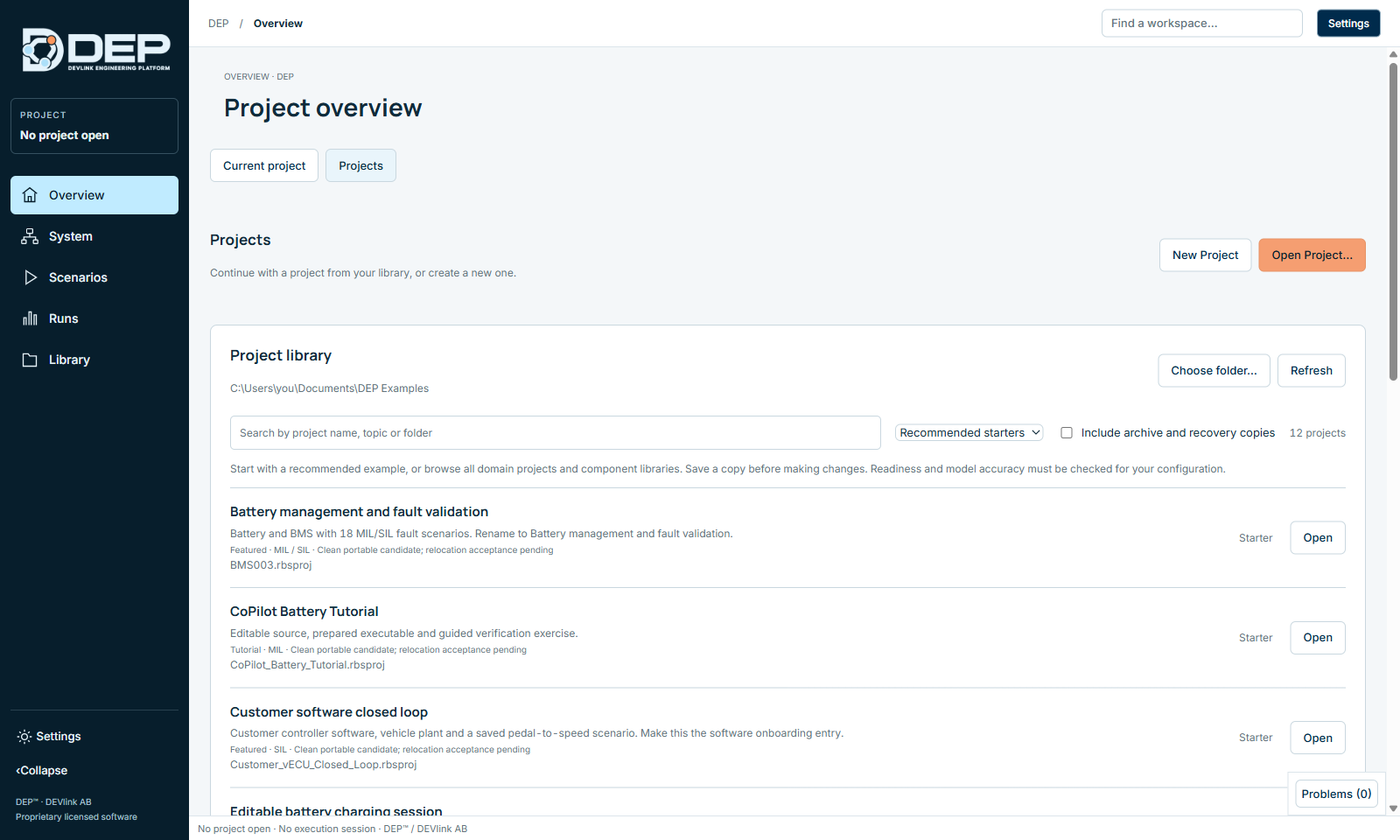
- Open the project libraryOn the Overview, select the Projects tab. A new installation shows the bundled example library.
- FilterKeep Recommended starters to see the nine starters and three tutorials, or choose All projects and libraries to include the ChargeLink EVSE project. Type in Search by project name, topic or folder, for example battery or CAN.
- OpenEach card shows a title, a summary, the category (Featured, Tutorial), the supported profiles (MIL / SIL), the status and the file name. Select Open.
- Save your own copyBefore you change anything, choose File → Save Project As... and save the project in your own folder.
Work on a copy. Open does not create a template copy. Running a project records sessions in it. Use File → Save Project As... first, and never edit projects inside the DEP installation folder. In a licensed installation, bundled examples open read-only (This bundled example is read-only.).
If an asset does not resolve after you move a project, see Troubleshooting.
The nine starters
| Title in DEP (file) | Profiles | Content | First exercise |
|---|---|---|---|
Editable battery charging sessionChargeLink_MIL_Editable.rbsproj | MIL | Charging controller, interlock, charger, battery and thermal models (5 components, 22 connections), operated from the EVSE console. No external software. | First Session: Charge 20 → 80 % |
Start your first modelPaired_Inputs.rbsproj | MIL | The smallest System: two Gain models, Command A and Command B. | Set an input in Component Properties (for example Command A = 5), Check, run 10 ticks and read Results: the output equals the input × gain. |
Virtual CAN controller and vehicleCAN_Restbus_Demo.rbsproj | MIL | Three ECUs on a virtual 500 kbit/s CAN bus, five 100 ms messages, a pedal sine generator and live decoded traffic. | Networks and Restbus (CAN) |
Multi ECU powertrain coordinationMulti_ECU_MIL_SIL.rbsproj | MIL SIL | BMS, VCU, MCU and EVCC applications and a vehicle plant, with CAN and CAN FD databases and three saved scenarios. The EVCC is not a complete ISO/DIN stack. | From MIL to SIL |
Customer software closed loopCustomer_vECU_Closed_Loop.rbsproj | SIL | A compiled customer-style controller, a vehicle plant and a saved pedal-to-speed scenario. The entry point for onboarding your own software. | Inspect the software interface, select SIL and run the saved scenario. See Software, FMI and SSP. |
Battery management and fault validationBMS003.rbsproj | MIL SIL | Battery and BMS with 18 saved MIL/SIL fault scenarios. | Run a named scenario in MIL, then the same case in MIL and SIL, and compare. |
Electric drive validationDRIVE003.rbsproj | MIL SIL | Drive plant and controller with 14 fault and response scenarios. | Run a feedback-loss or torque-response scenario. |
Flight control validationFLIGHT003.rbsproj | MIL SIL | Aircraft plant and flight controller with 14 scenarios. | Run a level-hold case, then a sensor-fault case. |
Stateful BMS with SIL KitStateful_BMS_SIL.rbsproj | SIL | Stateful BMS software with three saved lifecycle and fault scenarios. | Needs a separately configured SIL Kit registry and peer, which DEP does not start for you. |
The three authoring tutorials
Each tutorial contains an editable source, a prepared executable and a saved scenario with exact expected values. All three pass out of the box. Step-by-step instructions are in Authoring Tutorials.
| Title (file) | What you learn |
|---|---|
Physical RC TutorialPhysical_RC_Tutorial.rbsproj | A conserving electrical network: a 12 V source charging a 10 mF capacitor through 10 Ω, checked against the analytical solution. |
State Supervisor TutorialState_Supervisor_Tutorial.rbsproj | A state machine with Idle, Running and Faulted states, a latched fault and reset rules. |
CoPilot Battery TutorialCoPilot_Battery_Tutorial.rbsproj | From requirements to a 12-cell passive-balancing battery model, without a cloud AI service. |
Optional: ChargeLink EVSE
ChargeLink EVSE (ChargeLink_EVSE.rbsproj, category External integration) runs a live ISO 15118-20 DC EVSE session with the separately installed ChargeLink stack and an external EVCC. It requires a configured ChargeLink executable, TLS files and an IPv6 network, none of which are bundled. See Charging and the EVSE Console.
Guides bundled with the examples
The example folder also contains short guides you can open in any text editor: STARTER-TUTORIALS.md, MIL-SIL-START-HERE.md, MIL-SIL-SUPPORT.md (the supported scope), CAN-RESTBUS-DEMO.md and ChargeLink-DEMO.md. This user guide covers the same procedures in more detail.
Extended project library
Your organisation may provide the larger DEP project library, a folder with about 40 projects grouped as starters, lessons, advanced and specialist examples, and component libraries. Select Choose folder… on the Projects tab and pick that folder. Its catalogue file, DEP_PROJECT_CATALOG.json, provides the titles and categories.
| Category | Projects |
|---|---|
| Lessons | BMS001 (basic 4S/6S batteries), BMS002 (precharge, balancing, faults), DRIVE002, FLIGHT001, FLIGHT002, electric propulsion, roll control |
| Advanced | BEV SSP Reference (SSP interchange), CrossDomain (six multi-domain scenarios), VehicleDepth (vehicle dynamics), FlightControl Replacement (model-to-software replacement with virtual ARINC) |
| Specialist | Aircraft ARINC Roll, Airport, EVTOL, ElectricAircraft, Quadcopter Reference |
| Component libraries | Aircraft Library, UAS Library, EV Hybrid Library, CrossDomain Primitives (25 primitives), Controller Templates |
| Developer references | SIL002, distributed four lane |
| Do not start with | Customer demo 1–6 and RestbusProject (no runnable System), Aircraft SSP Sources (source documents only), DRIVE001 (driver inputs need refreshing) |
The library also contains vECU-Examples with reference controllers as executable, DLL and FMU (see Software, FMI and SSP).