
AI Connections
AI is optional in DEP. It is used only in Requirements to model, where the DEP Engineering CoPilot can suggest a physical specification, generate a control model or improve the wording of a requirement. Everything else in DEP works without AI, including the rule-based model builder.
What is sent, and when
- Nothing is sent until you have saved and enabled a connection.
- Before each request, DEP shows the destination and the requirements baseline it will send. You must tick I approve sending this baseline to the displayed destination. Nothing is sent until you approve.
- Test connection & discover models sends only authentication and a request for the model list. It sends no requirements or project data.
- DEP never switches to another provider on its own.
- Every AI proposal is validated before it becomes a model. Proposals that fail structural or behaviour checks are rejected (
DEP-AI-PROPOSAL,DEP-MODEL-BEHAVIOR), and nothing is created.
Check your organisation's rules before sending requirements to a cloud service. For confidential projects, use Local AI or an approved company endpoint.
Configure a connection
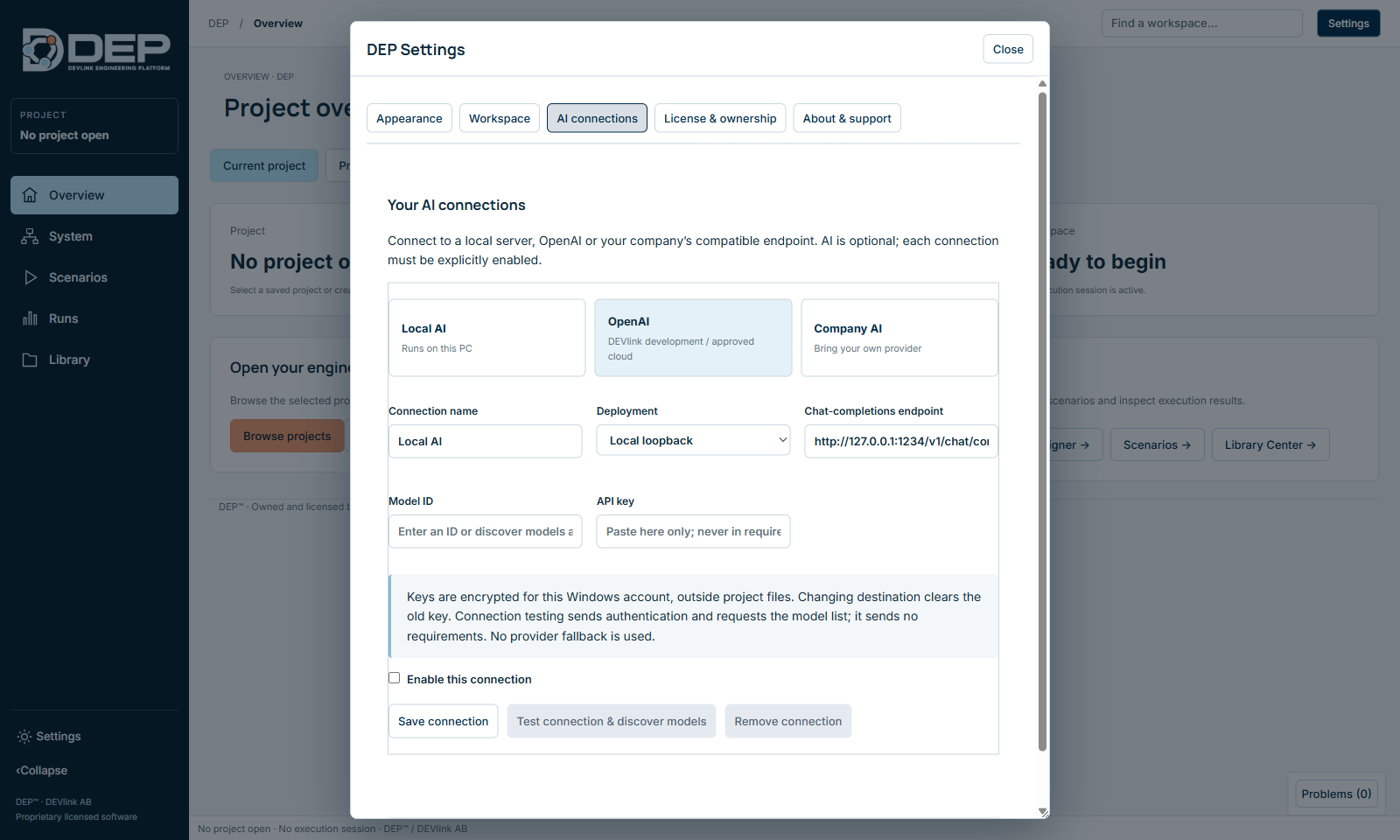
- Open the tabSettings → AI connections.
- Choose a templateLocal AI (a server on this PC, for example on 127.0.0.1), OpenAI (an approved cloud account) or Company AI (your organisation's OpenAI-compatible endpoint).
- Fill in the fieldsConnection name; Deployment: Local loopback or Remote / cloud HTTPS; Chat-completions endpoint, the full URL; Model ID; and API key if required.
- Enable and saveTick Enable this connection, then select Save connection.
- TestSelect Test connection & discover models. A successful test lists the models available to the key.
To remove a connection and its key, select Remove connection.
How keys are protected
- API keys are encrypted with Windows data protection for your Windows account and stored in
ai-connections.binin your DEP settings folder. They are never written into projects. - Changing the endpoint or deployment of a connection clears its key, so a key cannot be sent to a destination you did not enter it for.
- Support summaries never contain keys.
Limitations
- AI connections are available on Windows only.
- DEVlink does not vouch for the output of any AI provider. Treat every proposal as a draft: review the requirements links, run Check model and verify the model with independent expected values.
- If a connection fails, DEP shows
DEP-AI-PROVIDER. Check the endpoint, the model ID and your approval.