

Physical Model Designer
The Physical Model Designer builds physical networks the way you would draw a circuit. You place components such as sources, resistors, capacitors, contactors and battery cells, and wire their terminals. DEP derives and solves the equations. Open it with System → Physical Model Designer.
Executable subset. Only the electrical subset executes: Resistor, Capacitor, DC Voltage Source, Current Source, Electrical Reference, Ideal Switch, HV Contactor, Battery Cell, Battery Pack and Electrical Load. All other components carry the label Authoring only. You can place and document them, but they do not run.
The workspace
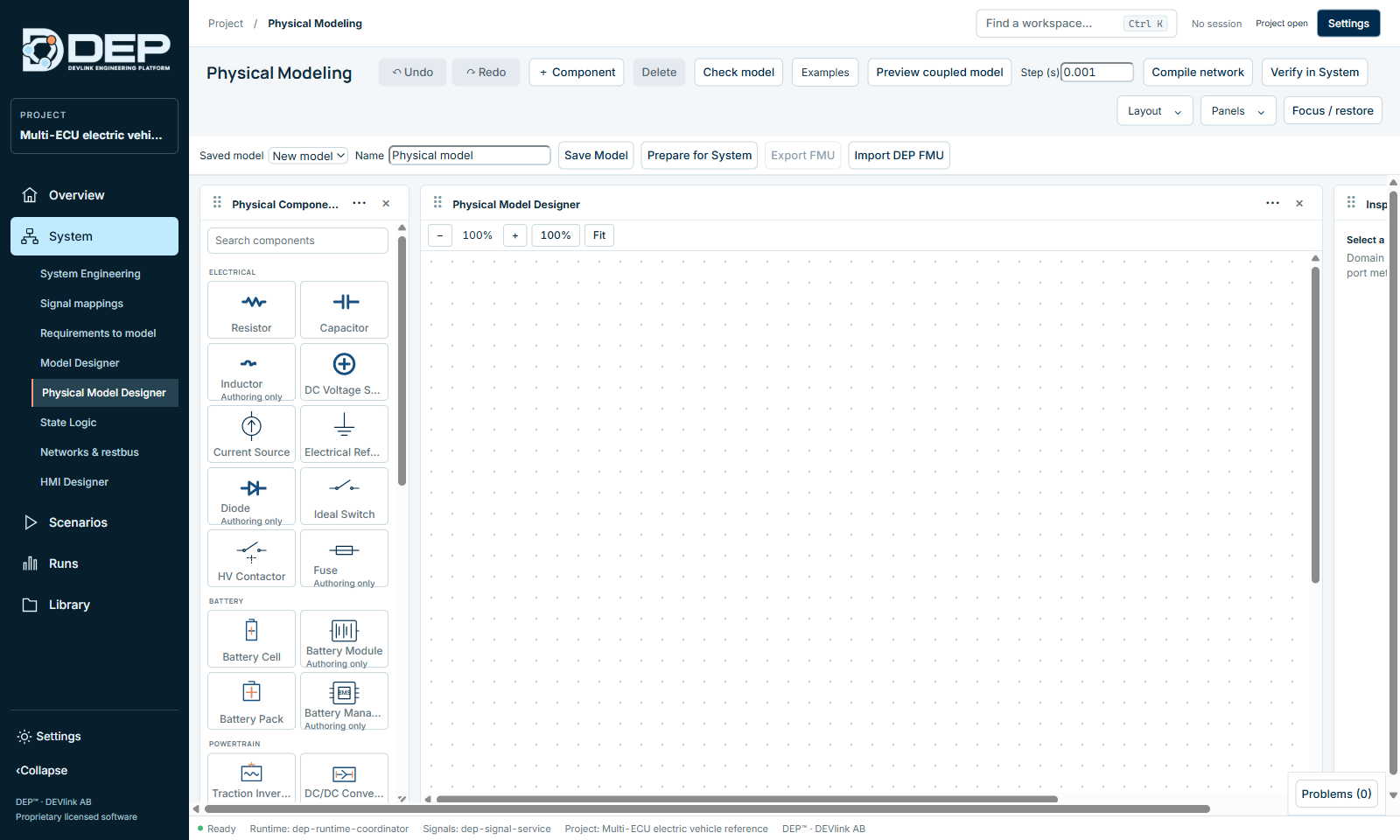
| Area | Contents |
|---|---|
| Toolbar | Undo, Redo, + Component, Delete, Check model, Examples, Preview coupled model, Step (s), Compile network, Verify in System. |
| Model bar | Saved model (choose a saved model or New model), Name, Save Model, Prepare for System, Export FMU, Import DEP FMU. |
| Physical Component Library | Components grouped by domain, with a search box. |
| Physical Model Designer | The canvas. |
| Inspector | Domain parameters, units and port metadata of the selected component. |
| DAE / Diagnostics | Results of checks and compilation (available from the Panels menu). |
Component library
| Group | Components (executable in bold) |
|---|---|
| Electrical | Resistor, Capacitor, Inductor, DC Voltage Source, Current Source, Electrical Reference, Diode, Ideal Switch, HV Contactor, Fuse |
| Battery | Battery Cell, Battery Module, Battery Pack, Battery Management System |
| Powertrain | Traction Inverter, DC/DC Converter, AC/DC Rectifier, Motor / Machine, Generator |
| Mechanical | Gearbox, Vehicle Body |
| Thermal | Thermal Mass, Thermal Conductor, Coolant Pump, Radiator / Heat Exchanger |
| Sensors | Temperature, Current, Voltage, Torque and Speed Sensor |
| Charging | EVSE, EVCC / OBC, Grid Source, Electrical Load |
Tutorial: a precharge circuit
A precharge circuit charges a DC-link capacitor through a resistor before the main contactor closes, to limit the inrush current. DEP includes it as an example.
- Load the exampleSelect Examples → Precharge example. The canvas shows HV source (400 V), Precharge (100 ohm), DC link (2 mF) and an Electrical reference, all wired in a loop.
- Inspect a componentClick the resistor. The inspector shows its resistance with unit, and its two electrical terminals.
- CheckSelect Check model. The diagnostics report Authoring checks passed and Physical draft pre-validation passed · 4 components. Numerical verification is a separate step.
- PreviewSet the fixed step in Step (s), for example 0.001, and select Preview coupled model. This compiles the network as a preview, without preparing an executable. The circuit's time constant is R × C = 100 Ω × 2 mF = 0.2 s. Choose a step much smaller than that.
- CompileSelect Compile network. A successful compile reports PASS — authored network compiled to a native model library.
- Save and prepareType a Name, select Save Model, then Prepare for System. The prepared model can now be added as a component in System Engineering.
- VerifySelect Verify in System to continue in Scenarios.
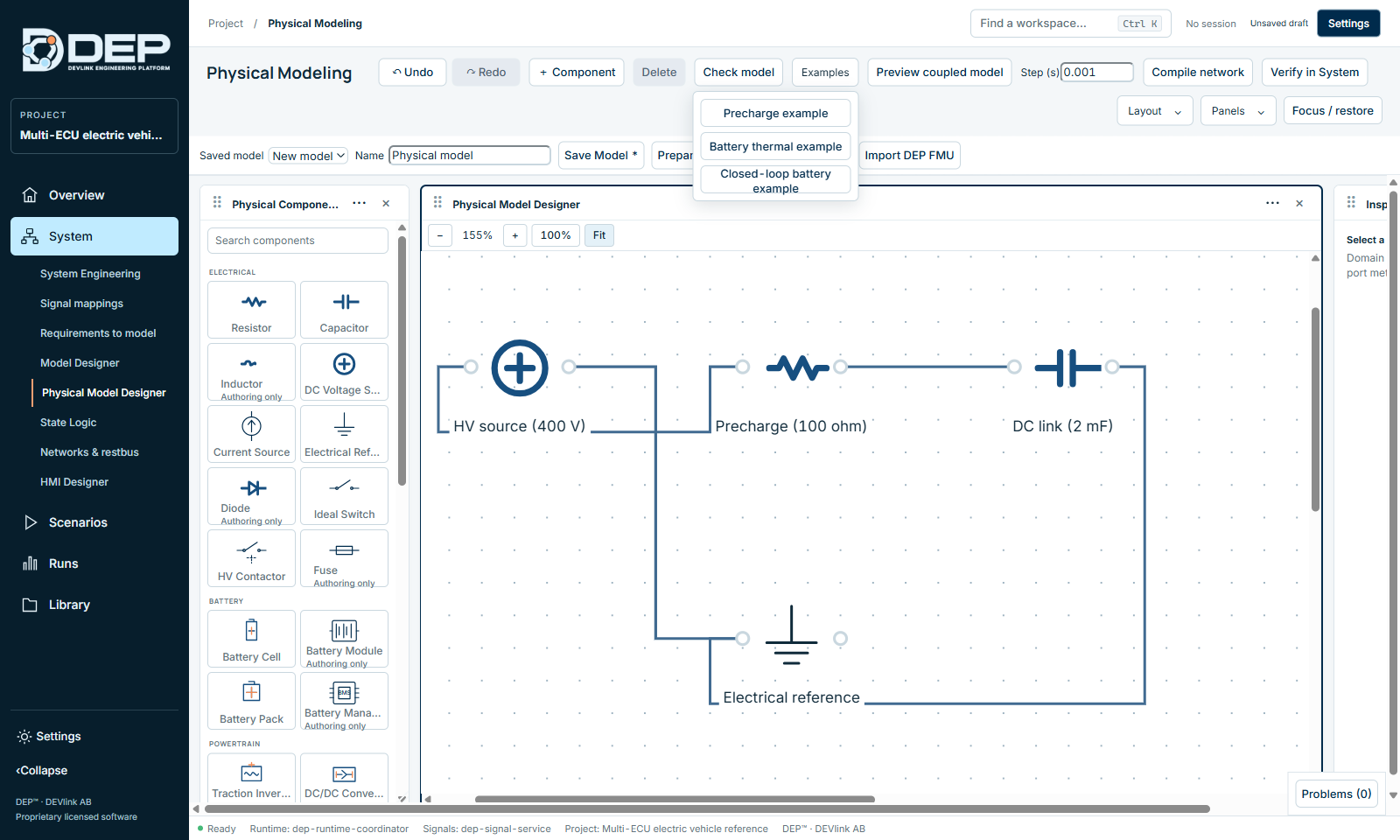
The other examples are Battery thermal example and Closed-loop battery example.
Build your own network
- Select New model in Saved model and type a name.
- Click components in the library, or use + Component, to place them.
- Connect terminals by clicking one terminal, then a terminal of another component. Each component has a p and an n conserving terminal, and the direction does not matter. Every electrical network needs an Electrical Reference (ground).
- Set parameters in the inspector. Units are shown next to each value.
- Check model → Compile network → Save Model → Prepare for System.
Messages
| Message | Meaning |
|---|---|
| Physical draft pre-validation passed · n components | The structure is valid. |
| PASS — authored network compiled to a native model library | The network compiled and can be prepared. |
| Authoring only on a component | The component does not execute. Remove it or replace it before compiling. |
| The native physical compiler requires the DEP desktop application. | Compilation runs in the desktop service. Restart DEP if it is unavailable (DEP-DESKTOP-BRIDGE). |
FMU exchange
Export FMU exports a prepared physical model as an FMU. Import DEP FMU imports a physical model previously exported from DEP.