Find your symptom below. Each entry gives the likely cause and the fix. If DEP shows a code such as DEP-RUN-OWNER, also see Diagnostic Codes. If nothing here helps, collect the information in Getting Support.
Installation and start-up
Symptom
Cause and fix
Windows shows Windows protected your PC
Verify the SHA-256 against the .sha256 file first. If it matches, select More info → Run anyway. See Install and Activate.
Installation could not finish
The destination is not empty or not writable, or a DEP process is still running. Close DEP, choose an empty folder or the existing DEP folder, and run setup again. Details are in %TEMP%\DEPSetup.log.
DEP does not start, or closes at once
Restart Windows to end leftover DEP processes, then start again. If it persists, reinstall over the existing installation (settings and projects are kept) and send DEPSetup.log and a support summary.
Text or panels are too large or too small
View → Zoom In / Zoom Out / Reset Zoom, and Settings → Appearance → Density. After changing the window size, use Layout → Engineering · recommended.
Project library and projects
Symptom
Cause and fix
No projects to show
The library folder has no .rbsproj files, or the wrong folder is selected. Select Choose folder… and pick your projects folder, then Refresh.
The library shows Error: The operation could not be completed… [DEP-UNEXPECTED…] and 0 projects
The saved library setting is unreadable or points to a folder that no longer exists. Select Choose folder… and choose a valid folder. This rewrites the setting.
Recovery or backup copies appear in the list
Turn off Include archive and recovery copies.
A project will not open
Open the automatic recovery copy <name>.rbsproj.recovery.rbsproj (DEP does this automatically if the main file is damaged). Make sure the -wal file was copied together with the project.
Opening another project is refused (DEP-PROJECT-RUNNING / -SOFTWARE / -TARGET)
Something is still executing. Use the button in the dialog to go to the owning workspace and stop it. Nothing was stopped or lost.
DEP-PROJECT-SAVE
The disk is full or the file is read-only (for example inside the installation folder or on a read-only share). Save a copy elsewhere with Save Project As....
A moved project reports missing assets
Copy referenced asset folders (.dep-assets, .assets, .dep-software-builds) together with the project, keeping the same relative location. Run Check.
Check reports a problem
Check lists each finding with its component. Common findings:
Finding
Fix
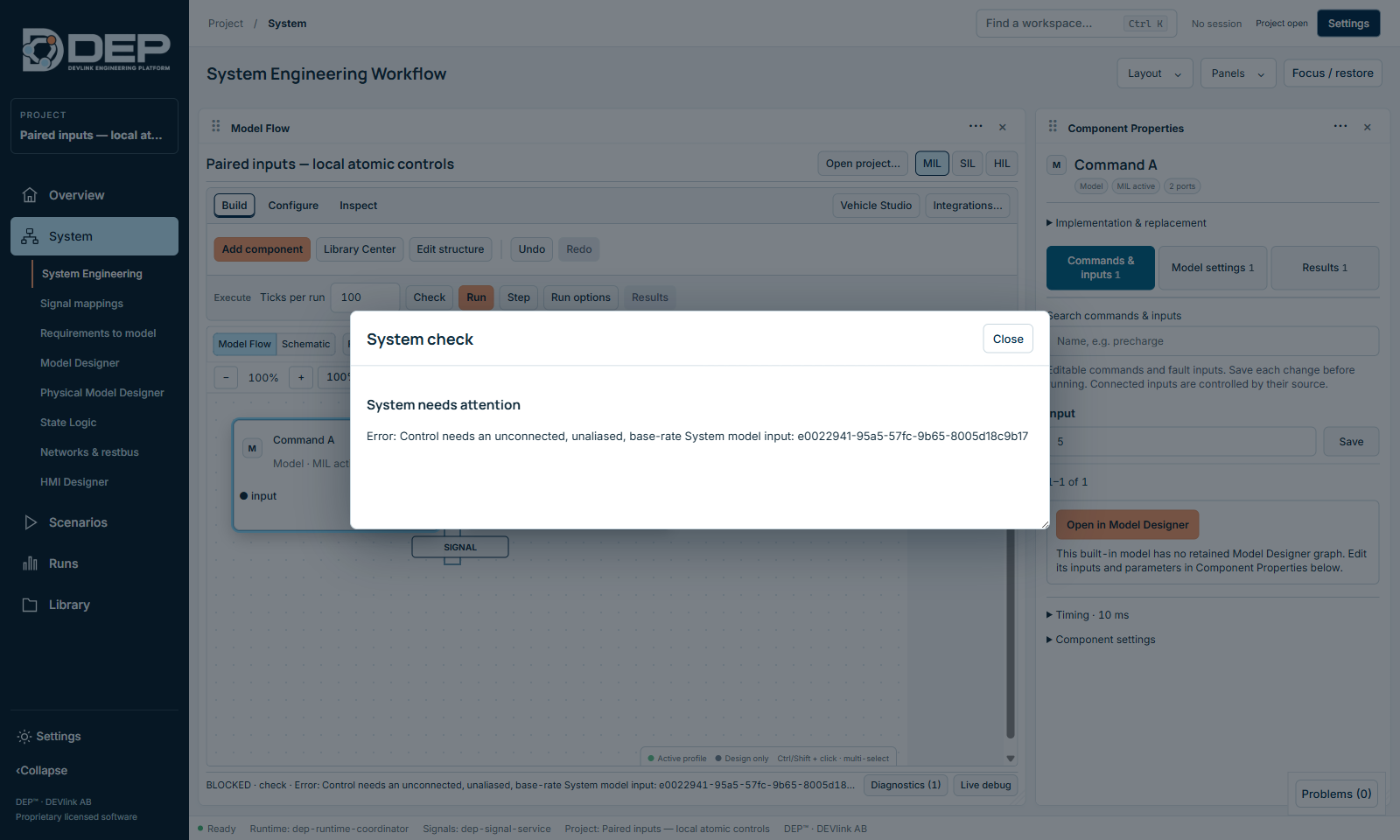
BLOCKED · check · Error: Control needs an unconnected, unaliased, base-rate System model input…
You connected a signal to an input that is driven by a saved control, such as the paired-input group in Start your first model or an HMI command. Remove the connection (Undo) or remove the control, then check again.
A component has no executable implementation for the profile
Assign one in Integrations… (SIL) or switch the profile. Logical components added with Add logical component are design-only until an implementation is bound.
Port or unit mismatch
Connect ports with matching types and units, or use Replace implementation with a reviewed port mapping.
Execution order conflicts with a connection
Change the order in Run options → Component execution order, or restore the default.
The component interface has changed
Restart DEP and reopen the project. If it persists, review the interface in Library Center and replace the implementation.
The FMU has no Windows x64 binary. Get a win64 FMU from the supplier.
A blocked check after connecting into an input that a saved control already drives.
Running
Symptom
Cause and fix
Another runtime owns execution… / DEP-RUN-OWNER
Another owner is active: a System session, a restbus acquisition, a campaign or a HIL deployment. Stop it in its workspace (see One execution owner at a time).
Stop the current session to edit values.
Select Reset & release session, edit, then run again.
Choose 1–1000 ticks…
Use at most 1000 ticks per run. Select Continue for more, or use a scenario.
Outputs do not change when I change an input
The input is connected (connected inputs take the source value), it is driven by a saved control or HMI command, or the value was not saved. Use Save next to it, and check the input's Connected · From … note.
The run seems slow
Logical time is not wall time. Large models, many components or fine physical steps take longer. Reduce the recorded outputs, close Live debug, or run batches in scenarios.
DEP-EVIDENCE-LIMIT
The project's recording budget is full. Export the results, then use a fresh project copy or raise Run options → Evidence storage limits.
DEP-REC-OWNER after a crash
Use Reset, or Stop → Check → Run.
Values show STALE
The session has stopped or paused. Values are the last committed ones, not live.
Scenarios
Symptom
Cause and fix
DEP-TEST-PROFILE
Select MIL or SIL in System Engineering. HIL scenarios cannot run here.
Saving a scenario fails with DEP-UNEXPECTED, and a step reads > undefined
A Check output step has no expected value. Edit the step, enter the value and save again. Where DEP detects the missing value, it reports DEP-TEST-DEFINITION with the step and reason instead.
Steps show Choose a variable
The variable does not exist in the active profile, for example after switching between MIL and SIL. Select the profile the scenario was written for, or edit the step.
A scenario fails although the run looked right
Check the tolerance: continuous values rarely match exactly. Expand the failed case to see the observed value.
Networks
Symptom
Cause and fix
No CAN frames appear
System Run does not drive the restbus. Stop the System, then select Start acquisition in Traffic / Streaming.
No messages configured — import a DBC in Topology
Import a DBC in the CAN / CAN FD activity.
Acquisition will not start
Another owner is active, or the restbus is faulted. Stop the owner, or reset the integrated runtime.
Mappings broken after a DBC update
Use Controlled remapping, then fix the remaining mappings in Signal Mappings.
Models
Symptom
Cause and fix
Correct the highlighted design issues…
Fix the highlighted blocks (unconnected ports, missing parameters), then Check model again.
My model change has no effect in the System
Save, Check model, Prepare for System, then select the new implementation for the component in System Engineering.
Preparing an edited physical or state-logic source fails on an installed PC
Rebuilding edited physical or state-logic sources needs compiler tools that DEP does not install. Contact DEVlink support. The prepared executables in the tutorials run without them.
This built-in model has no retained Model Designer graph.
Built-in models (for example Gain) are edited in Component Properties. For a graph, create an editable copy in Library Center.
Layout and display
Symptom
Cause and fix
A panel is missing or off screen
Panels → choose the panel (+), or Layout → Engineering · recommended.
A floating panel covers the buttons I need
Close it with × (for example Live Session Debug), or drag it aside.
Panels overlap after resizing the window
Layout → Arrange visible panels.
Imported layout rejected
The file was made for a different workspace. Export a layout from the same workspace.
Licence
Symptom
Cause and fix
LIC_WRONG_MACHINE
The licence was issued for another Machine ID. Send a new activation request from this PC.
LIC_GRACE or LIC_EXPIRED
Renew the subscription.
No seat available
All floating seats are in use. Ask a colleague to disconnect, or try later.
Every export opens a Save dialog. If you cancel it, nothing is written. If an export seems to do nothing, check the Problems panel for a diagnostic and that you can write to the chosen folder.